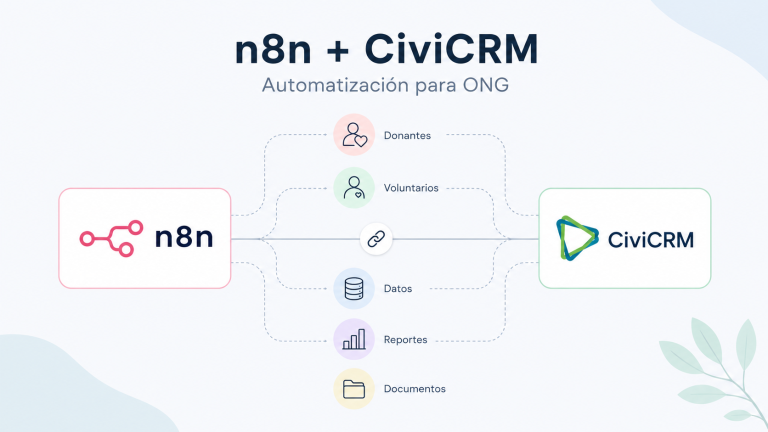
At iXiam, we have some exciting news to share with the CiviCRM community: we’ve developed the official n8n CiviCRM node, a verified integration that opens a new chapter for organizations looking to connect their CRM with the rest of their digital ecosystem.
This isn’t just another integration. For many NGOs, associations, and foundations, CiviCRM is already the heart of their operations, housing data on donors, partners, volunteers, activities, memberships, and relationships. With n8n, that heart can breathe differently: by connecting systems, automating tasks, reducing manual work, and transforming scattered data into clearer decisions.
Simply put, it’s like adding a third lung to the organization.
A new lung to breathe easier when teams are overwhelmed. To move data without manual copying. To connect CiviCRM with spreadsheets, files, reporting tools, communication platforms, work suites, and internal systems. So that technology stops being a burden and starts functioning as a support network.
Want to see what n8n can do with your CiviCRM?
Request a demo or a free consultation session with iXiam.
What is the official CiviCRM node for n8n?
The official CiviCRM node for n8n allows you to connect CiviCRM with automation flows created in n8n. This means that an organization can design automated processes between CiviCRM and other tools without having to develop a new integration from scratch each time.
Through this integration, n8n can communicate with CiviCRM and work with key entities such as contacts, memberships, groups, activities, and relationships. It also allows you to create, read, update, and delete records, as well as work with custom fields and more advanced calls to the CiviCRM API.
In practice, this allows CiviCRM to move beyond isolation and interact with many of the tools an organization already uses daily.
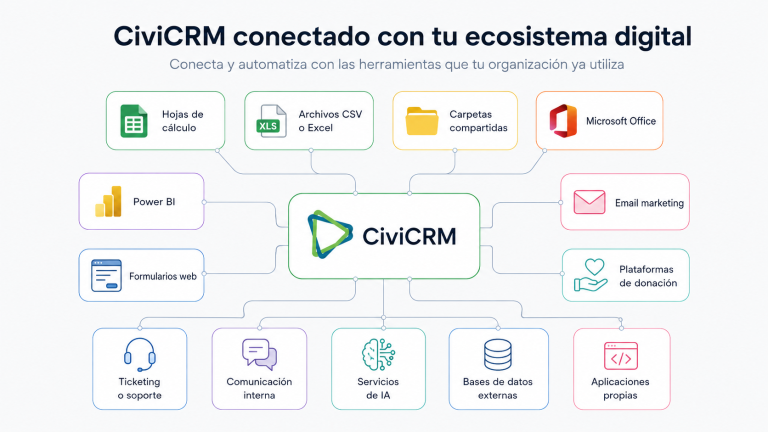
The difference isn’t just in connecting tools. The difference lies in designing processes that reduce errors, save time, and improve the quality of information.
Why is this development important for the CiviCRM community?
CiviCRM is a powerful tool for nonprofits because it understands something many general-purpose CRMs don’t: that a person can be a donor, volunteer, partner, participant, ally, board member, event attendee, or institutional contact all at the same time.
This relational richness is one of its greatest strengths. But it also presents a challenge: the more complex an organization’s operations, the more important it becomes to keep data connected, clean, up-to-date, and readily available for decision-making.
That’s where n8n provides a valuable layer of automation.
The CiviCRM node for n8n allows organizations to build customized workflows around their operational realities. It’s not about automating for the sake of a trend, but about freeing up team time, improving data consistency, and enabling each department to work with more reliable information.
For a social organization, this can translate into less administrative burden, fewer redundancies, greater traceability, and a more nurturing relationship with its community.
Automation for NGOs: Less Manual Work, More Focus on the Mission
Many organizations don’t have a lack of commitment. They have an excessive amount of operational work.
The team copies data from one Excel spreadsheet to another. They export contacts to upload them to a mailing tool. They cross-reference lists to see who attended an event. They manually update membership statuses. They download donations from an external platform. They prepare reports with data stored in different locations. They check for duplicates. They ask various departments to send them the “latest version” of a file.
Each of these tasks seems small. But together they consume hours, generate errors, and make it difficult for the organization to have a clear view of what’s happening.
With n8n and CiviCRM, many of these tasks can be transformed into automated workflows.
A workflow doesn’t replace human judgment. It enhances it. It allows people to spend less time moving data and more time interpreting it, nurturing relationships, designing strategies, and making better decisions.
n8n Use Cases with CiviCRM for Nonprofits
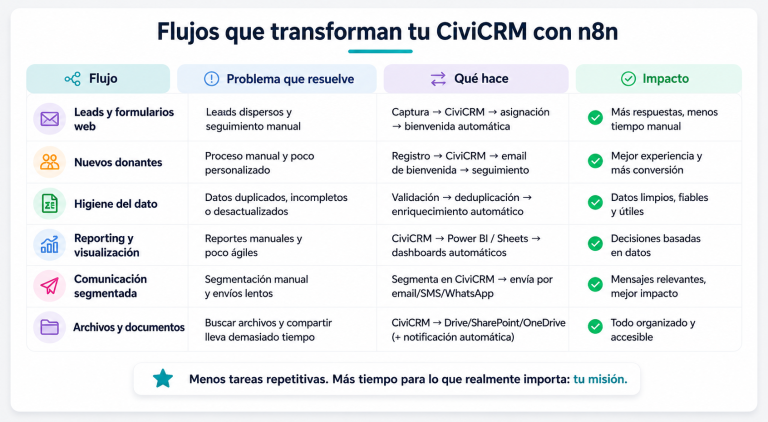
These are some concrete possibilities that an NGO, association, or foundation can explore with the CiviCRM node for n8n.
Want to see what n8n can do with your CiviCRM?
Request a demo or a free consultation session with iXiam.
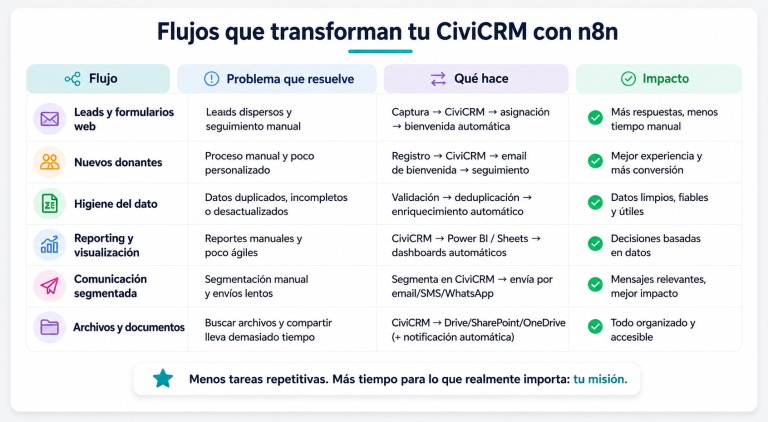
1. Synchronize Files and Archives with CiviCRM
Many organizations still receive information in CSV files, Excel spreadsheets, or shared folders. This can happen with activity lists, registrations, campaigns, donations, volunteer information, or data from external partners.
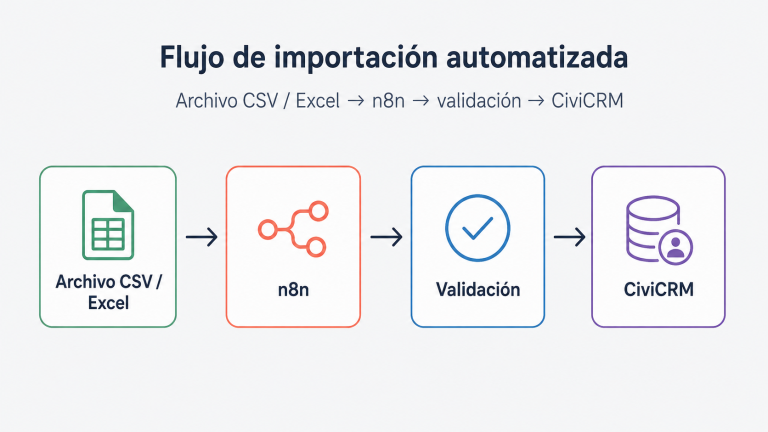
With n8n, you can create workflows that detect a new file, validate its structure, transform the data, and send it to CiviCRM in an organized manner.
Examples:
- Import attendees from a CSV file;
- Update contacts from a spreadsheet;
- Register new activities from external forms;
- Detect incomplete fields before uploading information to the CRM;
- Send alerts if a file has errors or duplicates.
This helps reduce reliance on manual imports and improves the traceability of data entering the system.
2. Improve Data Hygiene
Data quality is one of the biggest challenges for any CRM. In the non-profit sector, this is especially true given the often small teams, numerous data sources, and years of accumulated information.
n8n can help create automated processes to review, enrich, or correct information before it reaches CiviCRM or after it’s updated.
Examples:
- Detect contacts with invalid emails;
- Identify potential duplicates;
- Standardize phone numbers, countries, provinces, or postal codes;
- Complete required fields before activating a campaign;
- Review contacts without recorded consent;
- Mark records that require human review;
- Classify contacts by origin, relationship, or level of interaction.
- Automation doesn’t eliminate the need for good data governance, but it does help make it a continuous process rather than a one-off cleanup every few years.
3. Connect CiviCRM with Power BI and Reporting Tools
Organizations need to report on impact, activity, fundraising, engagement, and results. But often, the necessary data is scattered across CiviCRM, spreadsheets, external platforms, and internal systems.
With n8n, CiviCRM can be integrated with workflows that prepare data for visualization tools like Power BI.
Examples:
- Send aggregated donation data to a reporting dataset;
- Update partner or member engagement metrics;
- Poll volunteer dashboards;
- Prepare information for management reports;
- Consolidate data from campaigns, activities, and fundraising;
- Automate periodic data extractions without relying on manual exports.
This can help teams move from simply “preparing reports” to analyzing trends, identifying opportunities, and better explaining their impact.
4. Automate Tasks Between CiviCRM and Microsoft Office
Many organizations work daily with Microsoft 365: Outlook, Excel, SharePoint, OneDrive, Teams, and Word. Connecting these environments with CiviCRM opens up many practical use cases.
Examples:
- Automatically save files associated with an activity or contact;
- Create internal tasks when a new request is registered;
- Generate documents from CiviCRM data;
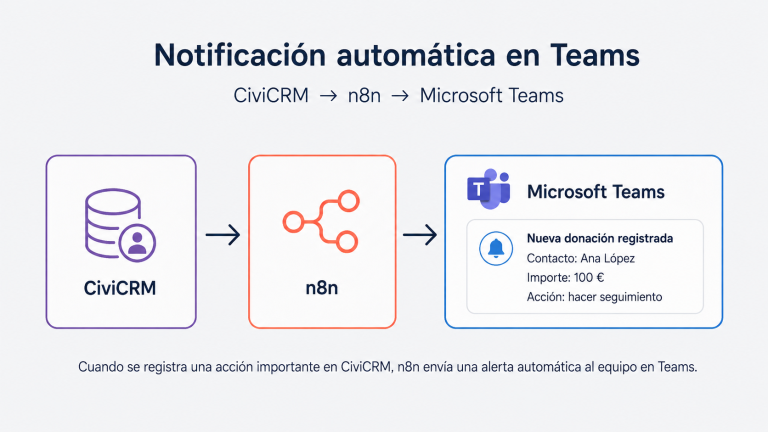
- Send notifications to a Teams channel when a significant donation comes in;
- Update a tracking sheet without duplicating work;
- Activate internal reminders for following up with major donors, partners, or allies.
The goal is not to replace the existing suite, but to better integrate it with the CRM so that information isn’t trapped in separate documents.
5. Improve relationships with donors, partners, and volunteers
Automation is valuable when it improves the user experience. In a nonprofit organization, this means nurturing relationships with donors, partners, volunteers, corporate allies, participants, and members.
With n8n and CiviCRM, you can design workflows that help you respond more effectively, express gratitude promptly, and personalize communications based on each person’s actual relationship with the organization.
Examples:
- Trigger a follow-up task when someone makes a significant donation;
- Send a welcome email when someone becomes a member;
- Record an activity when a volunteer participates in training;
- Segment contacts based on interests, campaigns, or level of engagement;
- Identify inactive members for reactivation campaigns;
- Notify the team when a strategic partner interacts with the organization;
- Connect external forms with onboarding processes within CiviCRM.
The key is to move from mass, reactive communication to a more contextual, structured, and sustainable relationship.
6. Reduce errors in lead generation and retention processes
When an organization acquires new contacts from forms, campaigns, events, donation pages, or external actions, errors can easily occur: duplicate records, incomplete data, improperly collected consents, mismatched fields, or information arriving late to the CRM.
With n8n, you can create workflows that validate and organize this information before incorporating it into CiviCRM.
Examples:
- Check if a contact already exists before creating it;
- Update data instead of duplicating it;
- Record the lead source;
- Automatically assign a campaign;
- Create a follow-up activity;
- Send a notification to the responsible team;
- Connect data entry with a welcome process.
This helps each new contact enter the system with more context and less friction.
7. Automate internal processes and free up team time
Not all automations need to be visible to donors or partners. Some of the most valuable automations are internal.
Examples:
- Creating tasks when a membership is updated;
- Notifying users of outstanding payments;
- Generating follow-up lists;
- Moving information between internal systems;
- Recording administrative activities;
- Sending alerts about incomplete data;
- Preparing periodic summaries for team coordination.
These automations reduce the operational workload and help teams avoid relying on individual memory or informal processes.
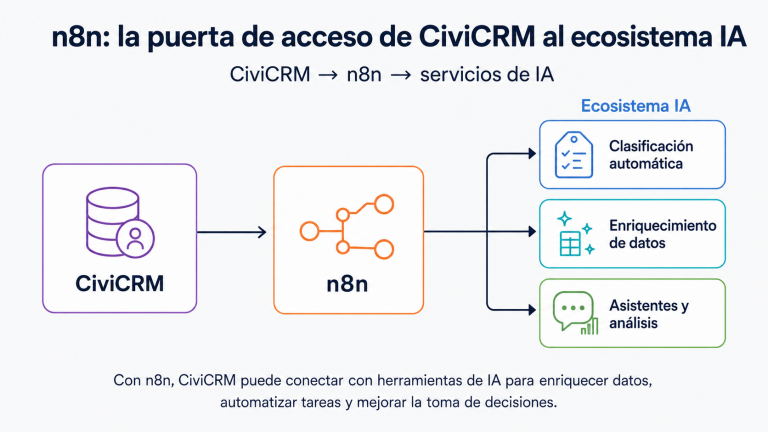
8. n8n as CiviCRM’s gateway to the artificial intelligence ecosystem
In addition to connecting CiviCRM with work, reporting, and communication tools, n8n opens up a particularly relevant opportunity: transforming CiviCRM into a system capable of interacting with artificial intelligence services. This allows users to explore workflows for classifying contacts, enriching data, summarizing interactions, detecting engagement patterns, prioritizing follow-ups, and preparing information for internal analysis. The key isn’t simply implementing AI because it’s trendy, but rather using it in a controlled manner, connected to the CRM and the most useful decision-making tools for the organization. With n8n, CiviCRM can become the foundation from which an NGO begins to incorporate artificial intelligence in a practical, gradual way, focused on improving relationships with donors, partners, volunteers, and allies.
An Opportunity for Small, Medium, and Large Organizations
Automation isn’t just for large organizations. It can also be very useful for entities that are starting to organize their data or that have recently transitioned from file-based management.
For a small organization, n8n can help eliminate the need to copy and paste information between tools.
For a medium-sized organization, it can connect departments that already work with defined, but still largely manual, processes.
For a large organization, it can help standardize workflows, improve reporting, and reduce risks in critical processes.
The question isn’t whether an organization “needs to automate everything.” The question is which repetitive, sensitive, or strategic processes should no longer rely on manual effort.
What problems can a consultation session on n8n and CiviCRM solve?
At iXiam, we offer a free demo or consultation session to explore how n8n can help your organization solve specific management, data, and community engagement challenges.
In this session, we can review questions such as:
- Where is your team wasting the most time?
- What data is being manually copied between systems?
- What processes generate the most errors or duplication?
- What information does management need to make decisions?
- What data should be automatically fed into CiviCRM?
- What tasks could be triggered when the status of a contact, membership, donation, or activity changes?
- What external tools need to connect with CiviCRM?
- How can we improve the experience of donors, partners, or volunteers with more agile processes?
- We can also help you identify quick wins: small, realistic, and high-impact automations that allow you to get started without redesigning your entire technology architecture.
Examples of workflows we can explore with you
Every organization is different, but these are some workflows that often have great potential in nonprofits:
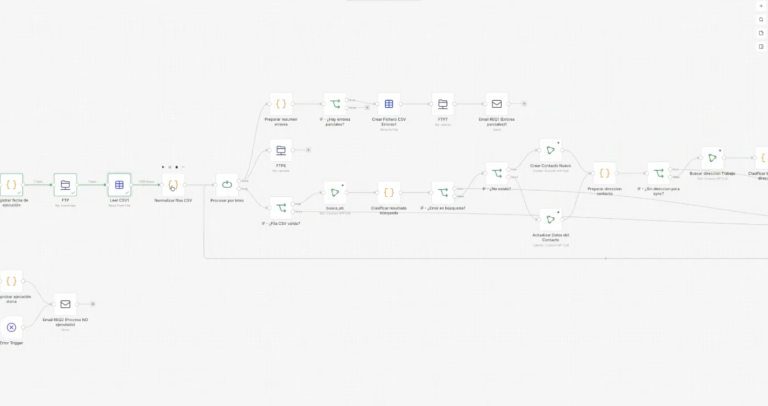
Workflow 1: Excel to CiviCRM without copying and pasting
When a new file is uploaded to a shared folder, n8n reviews the data, detects basic errors, transforms the format, and creates or updates contacts in CiviCRM.
Ideal for: registrations, activity listings, external campaigns, or data sent by partners.
Workflow 2: Automatic contact cleansing
When a contact is created or updated, n8n validates key fields, normalizes information, and flags potential duplicates for review.
Ideal for: organizations with historical databases, multiple forms, or distributed teams.
Workflow 3: Periodic reporting for management
Every week or month, n8n extracts relevant data from CiviCRM, prepares it, and sends it to a reporting tool or a structured file.
Ideal for: tracking lead generation, engagement, volunteering, memberships, or impact.
Workflow 4: Automatic Donor Follow-up
When a significant donation or important interaction is recorded, n8n creates a task, notifies the relevant team, and records the follow-up in CiviCRM.
Ideal for: donor retention, major donors, strategic campaigns, and institutional relations.
Workflow 5: Onboarding New Members or Volunteers
When someone registers as a member or volunteer, n8n activates a welcome sequence, creates internal activities, and updates follow-up fields.
Ideal for: improving the initial experience and ensuring important contacts are not left unattended.
Workflow 6: Connecting External Forms with CiviCRM
When someone completes an external form, n8n validates the data, checks if it already exists in CiviCRM, updates the record, and triggers the corresponding action.
Ideal for: contact forms, volunteer applications, fundraising campaigns, or information requests.
iXiam, Open Technology and Digital Resilience for Nonprofits
At iXiam, we have been working hand in hand with nonprofit organizations in Spain, Latin America, and Europe for almost 20 years. We have supported major international organizations, such as the Red Cross, Doctors Without Borders (MSF), and Amnesty International, as well as local foundations and associations that are leading the way in new ways of engaging with their communities.
Our work is not just about implementing technology. It’s about helping organizations develop digital resilience: organizing data, reducing operational burden, improving transparency, facilitating reporting, and strengthening relationships with donors, partners, volunteers, allies, and communities.
The official CiviCRM node for n8n is another step in that direction.
Because when technology is well-connected, teams breathe easier.
Want to see what n8n can do with your CiviCRM?
If your organization uses CiviCRM and wants to explore new ways to automate processes, improve data quality, or connect tools, we can help.
Request a free demo or consultation session with iXiam. We’ll review your case, identify specific opportunities, and show you how n8n can become a useful, secure automation layer tailored to your needs.
It’s not about automation for the sake of automation. It’s about freeing up time, improving decision-making, and nurturing the relationships that underpin your mission.
Want to see what n8n can do for your CiviCRM? Request a free demo or consultation session with iXiam.
Frequently Asked Questions about n8n and CiviCRM
What is n8n?
n8n is an automation tool that allows you to connect applications, move data between systems, and create custom workflows. Its value lies in enabling different tools to work together without always relying on manual processes.
What does the CiviCRM node for n8n allow you to do?
The CiviCRM node for n8n allows you to connect CiviCRM with automated workflows. This makes it easier to create, query, update, or delete information in CiviCRM and connect these processes with other tools in your organization.
Does n8n replace CiviCRM?
No. n8n does not replace CiviCRM. It complements it. CiviCRM remains the central system for managing contacts, relationships, memberships, activities, and data for your organization. n8n acts as an automation layer to connect CiviCRM with other systems and processes.
What types of organizations can benefit from n8n with CiviCRM?
NGOs, associations, foundations, social entities, cooperation organizations, international networks, professional associations, membership organizations, and any non-profit entity that wants to reduce manual work and improve data management can benefit.
Can CiviCRM be connected to Power BI using n8n?
Yes, workflows can be designed to extract, transform, or prepare information from CiviCRM and connect it with reporting processes or tools like Power BI, according to the architecture and needs of each organization.
How can I determine what automations my organization needs?
The best starting point is to review repetitive processes, points where data is copied manually, frequent sources of error, and reporting or tracking needs. At iXiam, we can help you identify these use cases in a free demo or consulting session.